Imagine you’re a sales director. You want to know: “Which of our top 10 customers ordered less this quarter than in the same period last year?” Today, you file a ticket with IT, wait two days, get an Excel file — and realize the question was interpreted slightly differently than you meant.
That’s not an edge case. That’s daily life at most mid-sized companies running an ERP system. The data is there. Access isn’t.
That’s exactly what I’m working on right now: connecting our ERP data to a self-hosted AI so business teams can ask questions in plain language and get precise answers — without a developer in the loop. What I’ve found: the obvious approach doesn’t work as well as expected. And the right approach requires thinking one level deeper.
The Text-to-SQL Promise — and Where It Breaks
Text-to-SQL is the obvious idea: the user asks a question in natural language, an LLM translates it into SQL, the database returns an answer. In demos it looks impressive. Frontier models like Claude 4, GPT-5, or Gemini 2.5 Pro hit over 85% accuracy on the Spider benchmark — a number that builds confidence.
The problem: Spider is a teaching dataset. 5 to 10 tables, clearly named columns, clean relationships. Your ERP looks nothing like that.
Spider 2.0 was built with real enterprise schemas from Snowflake and BigQuery deployments — hundreds of columns per table, columns named usr_trx_fl and tmp_stage_agg, domain-specific abbreviations that only someone with five years of company experience can decode. The result: even the best current models drop to under 25% accuracy. The implicit business logic embedded in real production systems isn’t readable from a schema alone — by any model.
Without a semantic layer, real enterprise deployments report 10–31% accuracy on actual production data.
The Real Problem: SQL That Lies
The tricky thing about text-to-SQL failures isn’t that queries crash. It’s that they run successfully and return the wrong numbers.
Three classic patterns from practice:
Fan-out errors: An LLM writes a query for “total revenue per customer” with a JOIN across customers, orders, and order_items. Correct syntax — but because orders already has multiple rows per customer and order_items has multiple rows per order, the result explodes. A customer with 10 orders averaging 5 items each gets 5x the correct revenue figure. No error, no warning, just wrong numbers in the dashboard.
Term ambiguity: “Revenue” means booked orders for sales, recognized earnings for accounting, and gross order volume for marketing. The LLM picks one interpretation — and nobody knows which one until numbers start contradicting each other.
Hidden business logic: A logistics company reported 98% on-time delivery through its BI tool. The new AI querying raw tables came up with 92%. The difference: the BI tool excludes “customer-waived delays.” That logic lives in the reporting tool’s code — not in the database. The LLM has no idea.
What a Semantic Layer Is
A semantic layer is an explicit definition layer between your database and the LLM. Instead of handing the model a schema and saying “build me SQL,” you define business terms once in code:
# Example: dbt MetricFlow Semantic Model
metrics:
  - name: monthly_revenue
    label: Monthly Revenue
    description: >
      Recognized revenue from closed orders,
      excluding cancellations and credit notes.
    type: simple
    type_params:
      measure: net_revenue_usd
    filter: |
      {{ Dimension('order__status') }} = 'recognized'
From this point on, monthly_revenue means exactly the same thing to everyone querying the system. The LLM no longer has to guess which table, which column, which filter. It only needs to choose: which metric, which time period, which dimension — and the semantic layer generates the SQL deterministically.
That’s the core difference: probabilistic SQL generation vs. deterministic query execution.
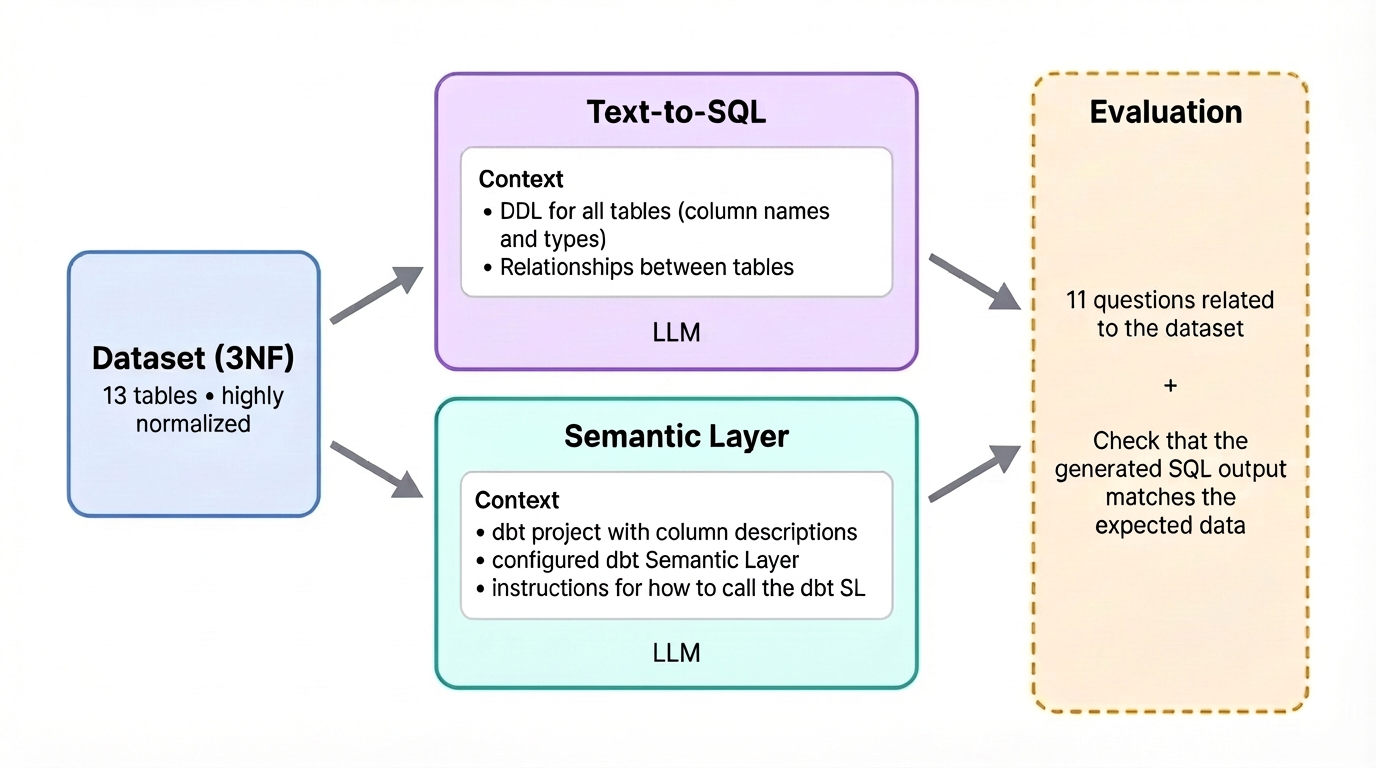
The Direct Comparison — Same Question, Two Approaches
Question from the accountant: “What were our receivables outstanding for more than 60 days at end of last month?”
Plain Text-to-SQL
The LLM receives the schema: ar_transactions, customers, invoices, payments. It produces:
SELECT c.customer_name, SUM(i.amount - COALESCE(p.paid_amount, 0)) AS outstanding
FROM invoices i
JOIN customers c ON i.customer_id = c.id
LEFT JOIN payments p ON i.invoice_id = p.invoice_id
WHERE i.due_date < CURRENT_DATE - INTERVAL '60 days'
GROUP BY c.customer_name
Runs fine. Returns numbers. But: the filter on invoice_status = 'open' is missing. Paid invoices with a due date older than 60 days are still included. The result is inflated — and nobody notices because the number looks plausible.
With Semantic Layer
The model is defined:
overdue_receivables_60d= open invoice total, due > 60 days, excluding paid and cancelled- Dimensions:
customer,region,account_manager
The LLM queries: get_metric("overdue_receivables_60d", time_grain="month", dimensions=["customer"]). The semantic layer always compiles this into the same, correct SQL — regardless of how the question was phrased.
The Numbers from the Current Benchmark
dbt Labs repeated their benchmark between text-to-SQL and semantic layer in April 2026 — this time with the latest models:
| Model | Method | Accuracy |
|---|---|---|
| Claude Sonnet 4.6 | Text-to-SQL | 90.0% |
| Claude Sonnet 4.6 | Semantic Layer | 98.2% |
| GPT-5.3 Codex | Text-to-SQL | 84.1% |
| GPT-5.3 Codex | Semantic Layer | 100.0% |
On raw, unnormalized tables (as found in real systems), text-to-SQL systems were at just 32.7% overall accuracy in 2023. With a properly modeled semantic layer: 72.7% to 100% — depending on question type.
But the most important finding from the benchmark isn’t the number itself:
When the semantic layer can’t answer a question, it says so. Text-to-SQL gives you a wrong answer that looks right.
That’s the difference between a failure you see and one you discover in the board meeting.
Concrete ERP Use Cases
The ERP system is where these questions come up most often. And it’s the classic example of a system with hundreds of tables, internal abbreviations, and business logic that’s documented nowhere.
Accounting:
- “Which customers have open invoices older than 30 days that haven’t been dunned yet?”
- “How does our cash flow look over the next four weeks?”
Procurement / Warehouse:
- “Which items are below reorder point and have an active supplier?”
- “What’s the inventory value of items that haven’t moved in 90 days?”
Sales:
- “Top 10 customers by contribution margin this quarter, sorted by change vs. prior year”
- “Which customers haven’t placed an order in 90 days but were previously regular buyers?”
Production:
- “Which production orders in the next two weeks are at risk due to material shortage?”
All of these questions span multiple ERP modules. No single module gives a complete answer. And without a semantic layer, the LLM has to reinvent the joins, filters, and definitions every time — with correspondingly variable results.
The 2026 Tooling Landscape
The market has split into two camps:
Headless (platform-agnostic):
- dbt MetricFlow — Code-first, YAML-based, generates SQL at runtime and pushes it against any warehouse. Open standard, part of OSI (Open Semantic Interchange).
- Cube.dev — Semantic layer plus MCP server, so AI agents can call metrics directly as tools (
get_metric()instead of SQL generation). Particularly good for multi-tool setups. - Wren AI — Open-source, beginner-friendly, with its own Metadata Definition Language (MDL). Good for teams who want to start fast.
Platform-native:
- Snowflake Cortex / Databricks Unity Catalog — YAML-based metric views directly in the warehouse. Less lock-in than before, good if you’re already in one of these ecosystems.
- Microsoft Fabric / Power BI Semantic Link — Strong for Microsoft-centric stacks. November 2025 saw a public preview of the Power BI Modeling MCP Server.
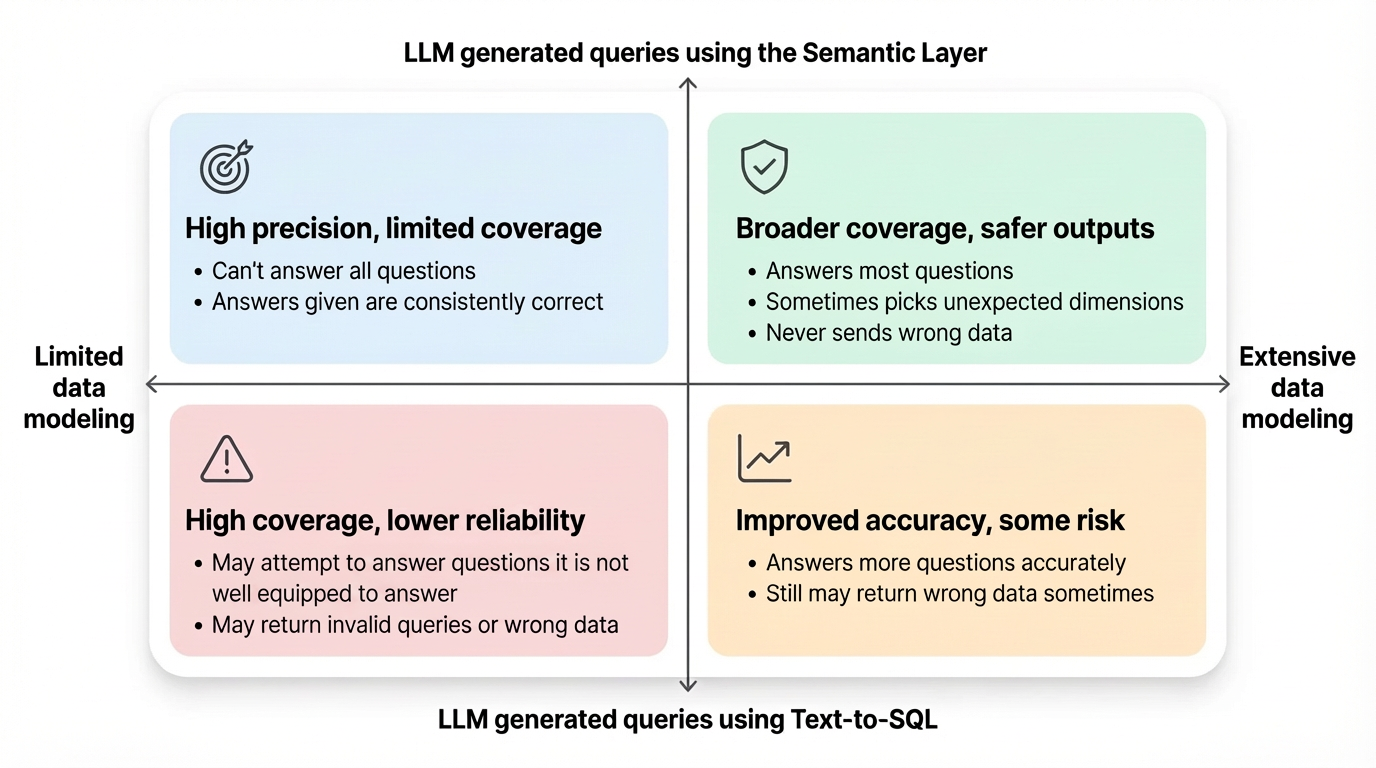
My Approach: Start With Tier-0 Metrics
What I’m building: a self-hosted AI instance that accesses our ERP data through a semantic layer. No SaaS, no data in third-party clouds, full control.
What I’ve learned in the process: don’t start with all 500 tables. That overwhelms both the modeling effort and the LLMs doing the routing.
Instead: define 10 to 20 “Tier-0 metrics” — the KPIs that get requested daily. Revenue, open receivables, inventory coverage, delivery rate. Define these cleanly in YAML, test them, validate them. Then expand incrementally.
Text-to-SQL stays in the picture as a fallback: for ad-hoc questions not yet modeled in the semantic layer, you let the LLM generate SQL — but knowing it’s probabilistic and should be validated. For anything landing in reports, dashboards, or regular queries: semantic layer.
The dbt recommendation aligns with my own experience:
Text-to-SQL for exploration and prototyping. Semantic Layer for anything going into board decks, auditor reports, or weekly KPI reviews.
Conclusion
The question is no longer whether business teams will use natural language for data queries. They will. The question is whether the answers are trustworthy.
Plain text-to-SQL is a strong starting point — but a risk in production. Not because LLMs are bad. Because business logic doesn’t live in column names. It lives in the heads of people who’ve worked with the system for years. A semantic layer makes this implicit logic explicit, versionable, and available to any AI — regardless of which model you’re running next year.
If you’re working on a similar setup — making ERP data accessible, using AI meaningfully, keeping control over your infrastructure — feel free to reach out. I’m happy to share what works and what doesn’t.